

Many small business owners believe shared hosting guarantees poor performance. This misconception costs companies thousands in unnecessary upgrades. Understanding web hosting terminology clears this confusion and empowers you to make confident, cost-effective hosting decisions. Whether you’re launching your first website or scaling an existing one, mastering these terms helps you avoid expensive mistakes and choose solutions that truly match your business needs.
Table of Contents
- Introduction To Web Hosting And Why Terminology Matters
- Understanding Core Hosting Types
- Key Web Hosting Terminology Explained
- The Importance Of Server Location And Data Centers In Switzerland
- Swiss Domain Extensions: .ch Vs .swiss
- Common Misconceptions And Clarifications
- Comparing Hosting Plans: Cost Vs Benefits
- Ensuring Security, Reliability, And Support
- Explore Hosting Solutions Tailored For Swiss SMBs
Key takeaways
| Point | Details |
|---|---|
| Understanding hosting types improves decisions | Knowing shared, VPS, dedicated, and cloud hosting characteristics helps match your business scale with appropriate infrastructure. |
| Server location impacts performance and compliance | Swiss data centers reduce latency for local visitors and ensure compliance with strict data protection laws. |
| Clarifying myths prevents costly mistakes | Debunking misconceptions about unlimited bandwidth and shared hosting performance saves money and optimizes website operations. |
| Cost versus control trade-offs guide selections | Balancing budget constraints with performance needs and scalability requirements leads to smarter hosting investments. |
Introduction to web hosting and why terminology matters
Web hosting means renting space and resources on a server to make your website accessible online 24/7. Without hosting, your website simply doesn’t exist on the internet. For small to medium business owners and developers, choosing the right hosting solution directly impacts site speed, security, and customer experience.
Four main hosting types dominate the market:
- Shared hosting pools resources among multiple websites on one server
- VPS (Virtual Private Server) allocates dedicated resources within a virtualized environment
- Dedicated servers provide exclusive access to an entire physical server
- Cloud hosting distributes resources across multiple connected servers for flexibility
Understanding these terms prevents expensive selection mistakes. A startup choosing dedicated hosting when shared would suffice wastes thousands annually. Conversely, a growing e-commerce site stuck on shared hosting faces crashes during peak traffic, losing sales and damaging reputation.
Hosting performance affects everything from page load speeds to search engine rankings. Scalability determines whether your infrastructure grows with your business or becomes a bottleneck. Cost factors shape your technology budget and return on investment. Domain hosting and virtual hosting basics form the foundation for these decisions.
Knowing terminology also improves communication with technical teams and hosting providers. When you understand what bandwidth, uptime SLAs, and SSL certificates actually mean, you negotiate better contracts and troubleshoot issues faster. This knowledge translates directly into competitive advantages for your business online presence. Learning how to choose web hosting starts with mastering these fundamental concepts.
Understanding core hosting types
Shared hosting places your website alongside dozens or hundreds of others on a single server. You share CPU, RAM, and storage with neighbors. This makes it the most affordable option, typically costing $3 to $15 monthly. Shared hosting suits low traffic websites, blogs, and small business sites expecting under 10,000 monthly visitors. The main limitation? One resource-hungry neighbor can slow down every site on the server.
VPS hosting creates isolated virtual environments on a physical server. You get guaranteed CPU cores, RAM allocation, and storage that other users cannot touch. This costs $20 to $80 monthly but delivers consistent performance. VPS works perfectly for growing businesses, developers needing custom configurations, and sites handling 10,000 to 100,000 monthly visitors. You gain root access for software installations while avoiding dedicated server costs.
Dedicated servers give you an entire physical machine. No sharing, no neighbors, complete control. Prices range from $80 to $500+ monthly depending on specifications. This option suits high traffic sites, resource-intensive applications, and businesses requiring maximum security. You handle all server management unless you purchase managed services. VPS offers scalability while dedicated servers provide highest control, making the choice dependent on your technical expertise and budget.

Cloud hosting distributes your website across multiple interconnected servers. If one server fails, another takes over instantly. You pay for actual resource usage, scaling up during traffic spikes and down during quiet periods. This flexibility costs $10 to $200+ monthly based on consumption. Cloud hosting excels for businesses with unpredictable traffic, seasonal peaks, or rapid growth trajectories.
| Hosting Type | Monthly Cost | Best For | Key Advantage |
|---|---|---|---|
| Shared | $3 to $15 | Small sites, blogs | Lowest cost entry |
| VPS | $20 to $80 | Growing businesses | Guaranteed resources |
| Dedicated | $80 to $500+ | High traffic sites | Complete control |
| Cloud | $10 to $200+ | Variable traffic | Automatic scaling |
Pro Tip: Start with VPS hosting if you expect steady growth. It bridges the gap between shared hosting’s limitations and dedicated servers’ complexity. Many businesses outgrow shared hosting within six months but don’t need dedicated power for years. Compare options using resources like VPS versus dedicated servers to understand which dedicated servers match your trajectory.
Key web hosting terminology explained
Bandwidth measures data transfer between your server and visitors. Think of it as a pipe: wider pipes handle more water simultaneously. A site with 10GB monthly bandwidth supports roughly 10,000 page views if each page weighs 1MB. Exceeding bandwidth limits either triggers overage fees or throttles your site speed. Calculate needs based on average page size multiplied by expected traffic, then add 30% buffer for growth.
Storage types dramatically impact performance. SSD (Solid State Drive) storage reads and writes data 10 to 20 times faster than traditional HDD (Hard Disk Drive). Your website loads faster, databases query quicker, and applications respond instantly. SSD costs more but delivers measurable improvements in user experience. For business sites, SSD storage is no longer optional; it’s essential for competitive page speeds.
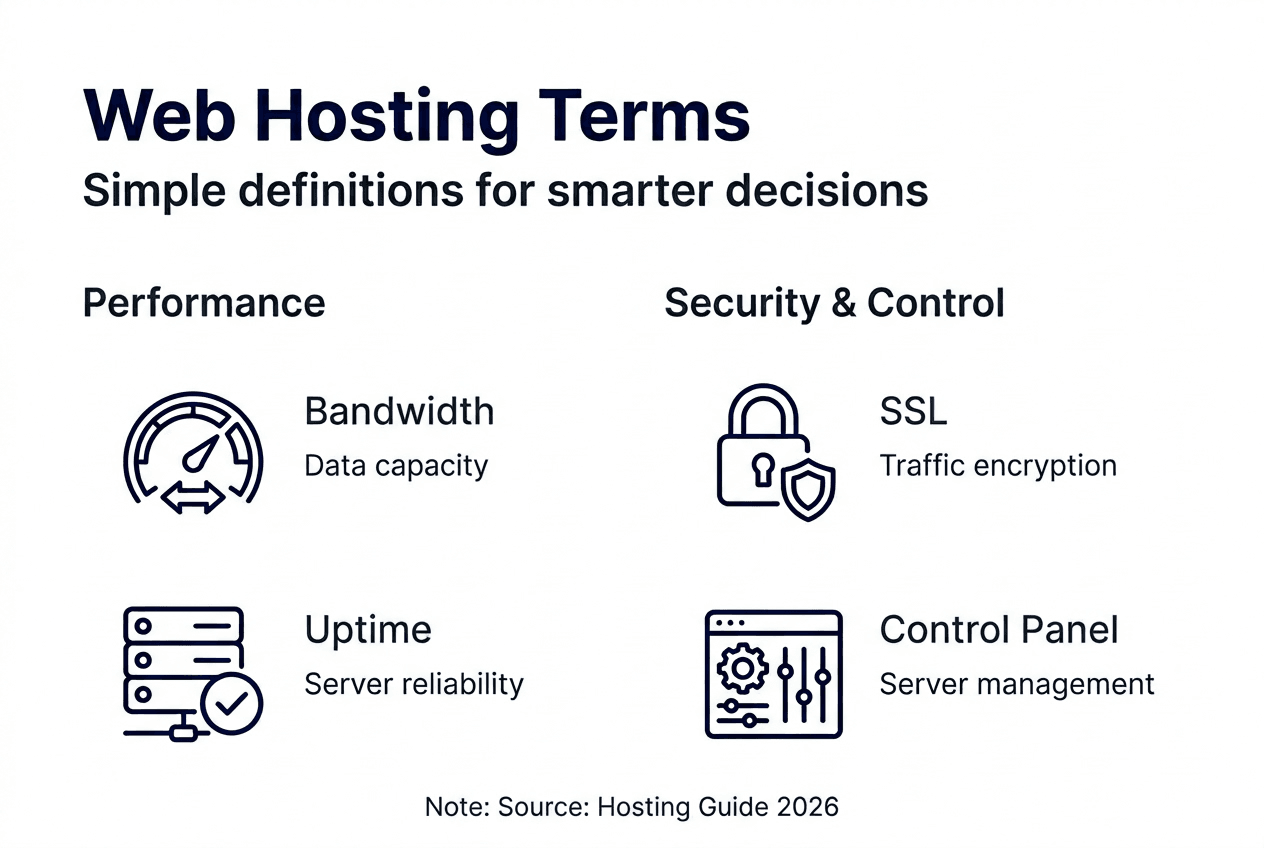
Uptime represents the percentage of time your server remains operational and accessible. A 99.9% uptime SLA means roughly 43 minutes of downtime yearly. That sounds minor until you calculate lost revenue during outages. For an e-commerce site earning $500 hourly, those 43 minutes cost $358 annually. Premium hosts guarantee 99.99% uptime (4 minutes yearly) with financial compensation for violations. Always verify uptime guarantees before committing.
SSL certificates encrypt data traveling between visitors and your server. This security protocol protects passwords, payment information, and personal data from interception. Browsers display padlock icons for SSL-secured sites and warn visitors about unsecured ones. Google also ranks SSL-protected sites higher in search results. Most hosts now include free SSL certificates, making this a baseline requirement rather than a premium feature.
Control panels simplify server management through graphical interfaces. cPanel and Plesk dominate this space, offering one-click installations for WordPress, email account creation, and file management without command-line knowledge. These tools transform complex server operations into point-and-click tasks. If you lack technical expertise, prioritize hosts offering robust control panels. They reduce dependence on developers for routine updates and configurations, as explained in guides about secure website hosting.
Pro Tip: Request test accounts or demos before purchasing. Experiencing the control panel firsthand reveals whether its workflow matches your technical comfort level. Some interfaces feel intuitive; others require steep learning curves.
The importance of server location and data centers in Switzerland
Swiss data protection laws require businesses handling personal information to store data within the country’s borders. The Federal Act on Data Protection imposes strict sovereignty rules. Hosting on servers outside Switzerland creates compliance risks and potential legal penalties. For SMBs serving Swiss customers, local data centers aren’t just convenient; they’re legally necessary.
Server proximity directly affects site speed. When a visitor in Zurich accesses a site hosted in Singapore, data travels 10,000 kilometers each direction. This adds 200 to 300 milliseconds of latency. Research shows 40% of visitors abandon sites loading slower than three seconds. Local Swiss servers reduce latency to under 20 milliseconds for domestic traffic. This speed advantage improves user experience, reduces bounce rates, and increases conversion rates.
Swiss data centers offer world-class security certifications. Many facilities maintain ISO 27001 certification, demonstrating comprehensive information security management. Physical security includes biometric access controls, 24/7 surveillance, and redundant power systems. Switzerland’s political neutrality and strong privacy laws provide additional protection from government overreach common in other jurisdictions.
Practical advantages extend beyond compliance and speed. Swiss hosting providers understand local business needs, offer support in German, French, and Italian, and operate within familiar time zones. When technical issues arise at 2 PM, you reach live support immediately rather than waiting for overseas teams to start their workday. This responsiveness prevents extended downtime that damages customer trust and revenue.
Businesses emphasizing data privacy as a competitive advantage gain credibility through secure Swiss website hosting. Medical practices, financial advisors, and legal firms particularly benefit from marketing Swiss-based infrastructure to privacy-conscious clients.
Swiss domain extensions: .ch vs .swiss
The .ch extension dominates Switzerland’s digital landscape with approximately 75% market share among Swiss businesses. Registered since 1987, .ch carries strong brand recognition domestically and internationally. No residency requirements exist, allowing anyone worldwide to register .ch domains. This openness makes .ch affordable and accessible, typically costing $10 to $20 annually. Most Swiss consumers instinctively trust .ch domains, associating them with legitimate local businesses.
The .swiss domain extension is strictly regulated and limited to organizations with verified Swiss presence. Applicants must prove Swiss incorporation, residency, or trademark registration. This exclusivity positions .swiss as a premium trust symbol, but registration costs $140 to $200 annually—significantly more than .ch. Only entities demonstrating genuine Swiss connections qualify, making .swiss impossible for international competitors to obtain.
SEO implications differ subtly. Google treats both extensions equally in search rankings, but user behavior varies. Swiss consumers searching for local services may perceive .ch as more established and .swiss as more exclusive. A boutique luxury brand might leverage .swiss for prestige signaling, while a general contractor benefits more from .ch’s widespread familiarity.
Branding strategy determines the right choice:
- Choose .ch for mainstream Swiss businesses, established companies, and budget-conscious startups
- Choose .swiss for luxury brands, organizations emphasizing exclusivity, and entities requiring verified Swiss authenticity
- Register both to protect brand identity and prevent competitors from capturing alternate extensions
Consumer trust research shows .ch domains outperform generic .com extensions for Swiss audiences by 30% in click-through rates. The familiar extension signals local presence and commitment to the Swiss market. Meanwhile, .swiss adds regulatory credibility that resonates particularly well in finance, healthcare, and premium consumer sectors where verification matters. Understanding Swiss domain nuances helps businesses optimize digital branding for their target audiences.
Common misconceptions and clarifications
Myth: Shared hosting always delivers poor performance. Reality: Modern shared hosting uses resource isolation technologies preventing one site from monopolizing CPU or RAM. Quality providers limit sites per server and actively monitor resource usage. A well-optimized WordPress site on premium shared hosting often outperforms a poorly configured site on VPS. The key differentiator is provider quality, not hosting type. Shared hosting fails when providers oversell servers, cramming 500+ sites onto hardware designed for 200.
Myth: Dedicated servers are necessary for all high traffic sites. Reality: Many sites handling 100,000+ monthly visitors run perfectly on VPS infrastructure. Cloud hosting architectures scale even further without dedicated hardware. Dedicated servers make sense for specific use cases: applications requiring custom kernel configurations, businesses needing dedicated IP addresses for security, or sites with sustained high resource consumption. If your site runs efficiently within VPS resource limits, dedicated servers waste money on unused capacity.
Misconception: Unlimited bandwidth means unlimited speed or traffic. Reality: Unlimited bandwidth refers to data transfer volume, not connection speed or simultaneous users. Providers throttle speeds or suspend accounts violating “acceptable use” policies. A shared hosting plan claiming unlimited bandwidth still shares a 1Gbps connection among hundreds of sites. Your actual speed depends on server load, not bandwidth allocation. Always check fair use policies defining what “unlimited” actually means for your provider.
Myth: Higher prices guarantee better service quality. Reality: Pricing correlates more with resource allocation than service quality. A $200 monthly dedicated server provides more raw power than a $40 VPS, but the VPS might offer superior uptime, faster support response, and better security if the provider invests in infrastructure. Evaluate providers based on uptime guarantees, support quality, security features, and verified customer reviews rather than assuming expensive equals better.
Comparing hosting plans: cost vs benefits
Pricing structures vary significantly across hosting types. Shared hosting starts at $3 to $15 monthly for basic plans supporting small business sites. VPS hosting ranges from $20 to $80 monthly depending on RAM, CPU cores, and storage. Dedicated servers cost $80 to $500+ monthly based on hardware specifications. Typical price ranges correlate with control and performance, creating clear trade-offs between budget and capabilities.
| Factor | Shared Hosting | VPS Hosting | Dedicated Server |
|---|---|---|---|
| Monthly Cost | $3 to $15 | $20 to $80 | $80 to $500+ |
| Performance | Variable | Consistent | Maximum |
| Control Level | Limited | Moderate | Complete |
| Technical Skill | Minimal | Moderate | Advanced |
| Scalability | Low | High | Highest |
Control differences shape your management experience. Shared hosting provides pre-configured environments with limited customization. You install applications through one-click installers but cannot modify server settings. VPS grants root access, allowing custom software installations and security configurations. Dedicated servers offer absolute control over every aspect, from operating system selection to hardware upgrades.
Scalability timing guides upgrade decisions. Monitor these warning signs:
- Page load times exceeding three seconds despite optimization efforts
- Regular resource limit notifications from your hosting provider
- Traffic growth exceeding 20% monthly over three consecutive months
- Downtime during traffic spikes even within bandwidth limits
- Need for custom software unavailable on shared hosting environments
Budgeting strategies for SMBs should allocate 2% to 5% of technology spending on hosting infrastructure. A company investing $10,000 annually in digital presence should budget $200 to $500 for hosting. This ensures adequate resources without overspending on unnecessary capacity. Start conservative with room to upgrade rather than overbuying capacity you won’t use for years.
Support levels affect total cost of ownership. Managed hosting costs 30% to 50% more but includes server maintenance, security updates, and troubleshooting. For businesses lacking in-house technical expertise, managed services prevent expensive downtime and security breaches. Unmanaged hosting saves money but requires staff capable of handling server administration.
Pro Tip: Calculate your cost per visitor by dividing monthly hosting fees by site traffic. If you’re paying $50 monthly for 5,000 visitors, your cost per visitor is $0.01. As traffic grows, this metric should decrease. If it increases, you’re likely on an inefficient hosting plan. Explore hosting plans for Swiss SMEs to find better value.
Ensuring security, reliability, and support
DDoS protection shields your website from distributed denial of service attacks that overwhelm servers with fake traffic. Attackers target businesses during critical periods like product launches or holiday sales. Quality hosting includes DDoS mitigation automatically filtering malicious traffic before it reaches your server. Without protection, attacks lasting just hours cost thousands in lost revenue and damage customer trust permanently.
Backup systems determine whether technical failures destroy your business or cause minor inconveniences. Automated daily backups with 30-day retention allow quick restoration after data corruption, hacking, or human error. Verify backup storage occurs off-site, preferably in separate geographic locations. A server failure shouldn’t also destroy your backups. Test restoration procedures quarterly to ensure backups actually work when needed.
Customer support quality separates premium hosts from budget providers. Look for these indicators:
- 24/7 availability through multiple channels (phone, chat, email)
- Average response times under 15 minutes for urgent issues
- Technical expertise with staff who understand server architecture, not just script readers
- Migration assistance for moving existing sites without downtime
Free migration services eliminate major barriers when switching providers. Technical teams handle DNS changes, file transfers, and database migrations while you maintain business operations. This support proves invaluable for businesses lacking dedicated IT staff, as detailed in secure hosting processes.
Certifications validate security practices. ISO 27001 demonstrates comprehensive information security management systems. PCI DSS compliance is mandatory for businesses processing credit card payments. GDPR compliance ensures proper handling of European customer data. Swiss hosts often maintain additional certifications specific to banking and healthcare sectors.
Redundant infrastructure prevents single points of failure. Multiple power supplies, network connections, and cooling systems ensure one component failure doesn’t cause downtime. Geographic redundancy distributes your data across multiple data centers, protecting against localized disasters. Advanced providers offer 99.99% uptime guarantees backed by service level agreements compensating you financially for violations.
Physical security matters as much as digital protection. Modern data centers employ biometric access controls, 24/7 security personnel, and surveillance systems. Secure facilities prevent unauthorized physical access to servers containing your business data. Companies like Done security solutions demonstrate the comprehensive approach professional hosting requires.
Explore hosting solutions tailored for Swiss SMBs
Understanding hosting terminology empowers smarter decisions, but choosing the right provider requires matching knowledge with reliable infrastructure. ThunderHosting specializes in Swiss-optimized hosting solutions combining local data centers, Swiss data protection compliance, and scalable infrastructure designed for growing businesses.
Our high performance web hosting plans start with robust shared hosting for new businesses, scale to powerful VPS hosting for expanding operations, and deliver enterprise-grade dedicated servers for demanding applications. Every plan includes free SSL certificates, automated backups, and 24/7 support from technical experts who understand Swiss business requirements. Whether you’re launching your first website or migrating complex infrastructure, our team provides the guidance and reliability your business deserves.
FAQ
What is the difference between shared and VPS hosting?
Shared hosting pools resources among multiple websites on one server, making it affordable but potentially inconsistent. VPS hosting allocates dedicated CPU, RAM, and storage within a virtual environment, providing guaranteed performance. VPS costs more but delivers consistent speeds and greater control for growing businesses.
Why does server location matter for my website?
Local servers reduce latency for Swiss visitors by keeping data geographically close, improving load speeds significantly. Swiss data centers also ensure compliance with strict data protection laws requiring personal information to remain within the country. Faster speeds and legal compliance make local hosting essential for Swiss businesses.
Can I rely on unlimited bandwidth claims?
Unlimited bandwidth refers to data transfer volume, not connection speed or simultaneous users. Providers enforce fair use policies that suspend accounts exceeding reasonable resource consumption. Always review terms defining acceptable use limits and verify actual bandwidth speeds rather than assuming unlimited means unrestricted.
When should I consider upgrading my hosting plan?
Upgrade when page load times consistently exceed three seconds, you receive frequent resource limit warnings, or traffic grows beyond 20% monthly for three months. Regular downtime during normal traffic levels also signals inadequate hosting. Review hosting plans for SMEs when your current infrastructure limits business growth.
Recommended
- How to choose web hosting for small businesses in 2026 – ThunderHosting
- What is my IP address – ThunderHosting
- Web Hosting Trends 2026: 50% Latency Cuts for Swiss Sites – ThunderHosting
- What Is Web Hosting – Powering Business Online Success – ThunderHosting
- Basic Website Design | AI and Digital Marketing Service by MCNM
- What Is Web Development and Why It Matters