

Many small business owners assume web hosting is a one-size-fits-all commodity, but that mindset can limit growth potential. Hosting customization lets you tailor server resources, software stacks, and security protocols to match your specific business needs. Whether you run a growing agency managing client sites or an ecommerce store handling seasonal traffic spikes, understanding how to customize your hosting environment can dramatically improve performance, reduce costs, and give you operational control. This guide explains what hosting customization really means, compares popular hosting types, and shows you how to implement customization effectively without overwhelming your team.
Table of Contents
- What Is Hosting Customization? Defining Its Scope And Value
- Security And Performance Considerations In Hosting Customization
- Comparing Hosting Types: Managed Vps, Dedicated Servers, And Cloud Options
- How To Implement Hosting Customization Effectively For Your Business
- Explore Customizable Hosting Solutions With Thunderhosting
- Frequently Asked Questions
Key takeaways
| Point | Details |
|---|---|
| Customization balances control and performance | Tailoring hosting resources improves site speed and scalability for growing SMBs. |
| Managed VPS suits agencies scaling clients | Offers root access with managed infrastructure, ideal for developers handling multiple sites. |
| Security requires ongoing attention | Regular audits and trusted tools reduce vulnerabilities introduced by customization. |
| Cloud hosting varies widely by provider | Speed, cost, and feature sets differ significantly across major cloud platforms. |
| Choose based on business size and skills | Match hosting type to your current traffic, budget, and technical capacity. |
What is hosting customization? Defining its scope and value
Hosting customization means tailoring your web hosting environment to fit your specific business requirements rather than accepting default configurations. This includes adjusting server resources like CPU and RAM, selecting software stacks such as PHP versions or database engines, choosing control panels, implementing custom security rules, and configuring automatic scaling for traffic fluctuations. The goal is to optimize performance, control costs, and maintain operational flexibility as your business grows.
SMBs and developers seek customization for several practical reasons. Improved performance tops the list because custom configurations reduce page load times and handle traffic spikes more effectively than generic shared hosting. Cost savings emerge when you allocate resources precisely to your needs instead of paying for unused capacity. Operational control matters too, you can install specific applications, adjust security settings, and integrate third-party tools without waiting for hosting provider approval.
Common forms of hosting customization include:
- Shared hosting with limited tweaks like choosing PHP versions or enabling specific caching plugins
- Managed VPS where you get root access but the provider handles server maintenance and security patches
- Dedicated servers offering complete control over hardware and software configurations
- Cloud setups that let you scale resources dynamically and deploy across multiple geographic regions
Finding the right balance is essential. Too much customization can overwhelm SMBs without dedicated IT staff, leading to security gaps or performance issues. Custom hosting solutions for SMBs often work best when they combine flexibility with managed services, letting you adjust key settings while the provider handles infrastructure complexity.
As John Doe, Hosting Solutions Architect emphasizes, SMBs benefit most when they balance customization options with managed services that reduce infrastructure burden. This approach enables businesses to support growth, handle traffic spikes, and meet security demands without hiring full-time system administrators. Managed solutions give you the customization you need while keeping technical overhead manageable.
Pro Tip: Start with managed hosting that offers customization options rather than jumping straight to unmanaged dedicated servers. You can always upgrade as your technical capacity grows.
Security and performance considerations in hosting customization
Customizing your hosting environment introduces both opportunities and risks. When done poorly, customization increases your attack surface by adding poorly configured software, outdated plugins, or weak access controls. Regular security audits and using trusted themes and plugins become crucial. You need to verify that custom configurations follow security best practices, especially when you gain root access or install third-party applications.

WordPress security essentials highlight that customization can introduce vulnerabilities if not handled carefully, with regular audits and reputable plugins minimizing risks. This applies broadly to any customized hosting environment, not just WordPress sites. When you modify server configurations, you take on responsibility for maintaining security patches and monitoring for suspicious activity.
Performance varies dramatically based on hosting type and how you configure it. Time to First Byte (TTFB) serves as the key speed metric because it measures how quickly your server responds to initial requests. Lower TTFB means faster page loads and better user experience. Customization lets you optimize TTFB through caching strategies, database tuning, and content delivery network integration.
Providers differ significantly in how well they maintain uptime and handle load spikes. Some excel at consistent performance under normal conditions but struggle when traffic surges. Others build infrastructure specifically to absorb sudden demand increases without slowdowns. Custom hosting security strategies help you evaluate which configurations match your traffic patterns and security requirements.
Several technical approaches improve both performance and reliability:
- Caching stores frequently accessed content in memory for instant delivery
- Containerization isolates applications to prevent conflicts and improve resource efficiency
- Edge locations distribute content geographically to reduce latency for global visitors
- Load balancing spreads traffic across multiple servers to prevent bottlenecks
These strategies work best when combined thoughtfully rather than implemented randomly. A well-configured VPS with strategic caching often outperforms a poorly optimized dedicated server.
Pro Tip: Always test performance under simulated load before launching major campaigns or product releases. Monitor latency continuously and set up alerts for unusual spikes that might indicate security issues or configuration problems.
Comparing hosting types: managed VPS, dedicated servers, and cloud options
Shared hosting offers minimal customization and suits SMBs with low traffic and simple websites. You share server resources with dozens or hundreds of other sites, limiting your ability to install custom software or adjust performance settings. Costs run low, typically $3 to $15 monthly, but you sacrifice control and performance predictability.
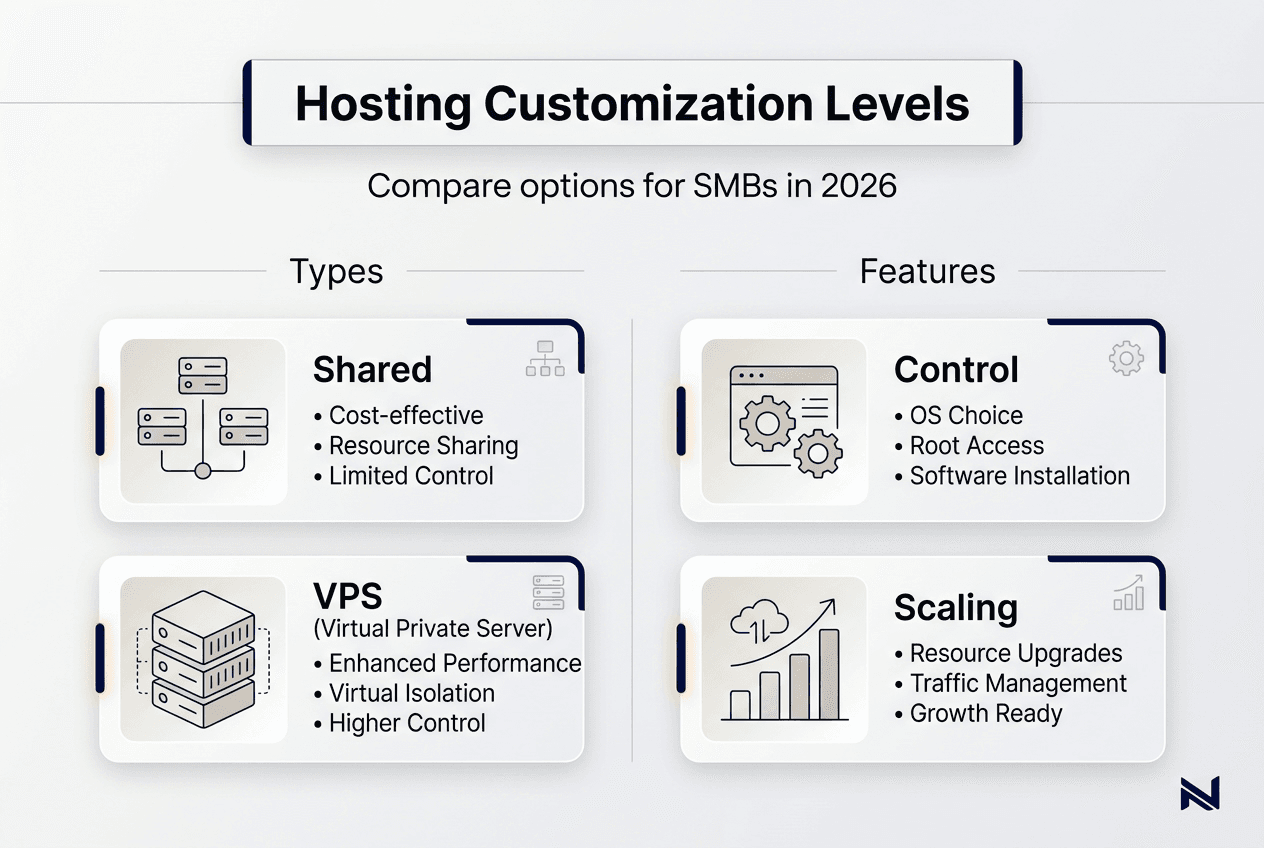
Managed VPS provides the sweet spot for many growing businesses and agencies. You get root access to configure your environment while the hosting provider handles server maintenance, security patches, and infrastructure monitoring. This balance lets developers customize software stacks and resource allocation without managing physical hardware. Pricing ranges from $20 to $100 monthly depending on resources, making it affordable for agencies managing multiple client sites.
Managed VPS and dedicated server hosting offer better performance and control than shared hosting for agencies, as demonstrated by Studio Alpha’s experience. The design agency boosted their client base by 250% after switching from shared hosting to dedicated cPanel hosting, proving that the right hosting type directly impacts business growth capacity.
Dedicated servers deliver maximum control and performance for larger operations or resource-intensive applications. You rent an entire physical server, giving you complete authority over hardware and software configurations. This option suits businesses with high traffic volumes, strict security requirements, or specialized software needs. Monthly costs start around $100 and can exceed $500 for enterprise-grade hardware.
Cloud hosting introduces flexible scaling and global presence through providers like AWS, Google Cloud, and DigitalOcean. Resources scale automatically based on demand, and you can deploy across multiple geographic regions for low latency worldwide. Cloud hosting provider benchmarks reveal significant differences in speed, cost, and feature sets across major platforms. Some excel at GPU workloads for AI applications, others optimize for edge computing, and pricing models vary from pay-per-use to reserved capacity discounts.
| Hosting Type | Customization Level | Best For | Monthly Cost Range |
| — | — | — |
| Shared | Low | Simple sites, low traffic | $3 to $15 |
| Managed VPS | Medium-High | Growing agencies, multiple sites | $20 to $100 |
| Dedicated | Very High | High traffic, specialized needs | $100 to $500+ |
| Cloud | High | Variable traffic, global reach | $10 to $1000+ |
Each hosting type serves different business stages and technical requirements. VPS vs dedicated servers comparison helps you evaluate which option matches your current and projected needs.
Pro Tip: Choose hosting based on your projected client load and technical capacity, not just current needs. Planning for growth prevents costly migrations later and ensures your infrastructure scales smoothly as your business expands.
How to implement hosting customization effectively for your business
Successful hosting customization starts with assessing your actual business needs rather than chasing features you might never use. Consider your current traffic volume, growth projections, technical team skills, budget constraints, and specific application requirements. A clear needs assessment prevents overbuying resources or choosing configurations that exceed your team’s ability to manage.
Follow these steps to implement hosting customization effectively:
- Define your goals by identifying specific problems you want to solve, such as slow page loads, frequent downtime, or inability to install required software.
- Select the hosting type that matches your technical capacity and budget, using the comparisons outlined earlier.
- Configure your environment by setting up necessary software stacks, security rules, backup schedules, and monitoring tools.
- Implement security measures including firewalls, SSL certificates, regular updates, and access controls.
- Test performance under realistic load conditions using tools that simulate traffic spikes and measure response times.
- Monitor regularly by tracking uptime, resource usage, security alerts, and user experience metrics.
Many SMBs make the mistake of treating hosting as a line-item rather than an operational asset, which can lead to hidden costs during outages. This mindset causes businesses to skimp on hosting quality, resulting in lost revenue when sites crash during peak traffic periods. View hosting as critical infrastructure that directly impacts customer experience and business continuity.
Regular backups form your safety net against data loss from security breaches, human error, or hardware failures. Automate daily backups and store copies in separate geographic locations. Test your backup restoration process quarterly to verify that you can actually recover data when needed. Many businesses discover their backups are corrupted or incomplete only after a disaster strikes.
Updates and patches require consistent attention because outdated software creates security vulnerabilities. Enable automatic updates for operating systems and core applications when possible, but test updates in staging environments before applying them to production servers. This prevents compatibility issues from breaking your live site.
Incident response plans outline exactly what to do when problems occur. Document procedures for common issues like traffic spikes, security breaches, or server failures. Include contact information for your hosting provider, backup administrators, and key team members. Practice your response plan annually so everyone knows their role during actual emergencies.
Partner with providers that offer the right balance of customization and managed support. Benefits of managed hosting for SMBs include expert assistance with configurations, proactive monitoring, and rapid response to technical issues. This partnership model lets you focus on growing your business while professionals handle infrastructure complexity.
Pro Tip: Document all your hosting configurations, including custom settings, installed software, security rules, and integration details. This documentation proves invaluable for troubleshooting problems and training new team members as you scale.
Explore customizable hosting solutions with ThunderHosting
Now that you understand how hosting customization drives business growth, consider how ThunderHosting can support your specific needs. We offer customizable hosting plans designed for SMBs and developers who need scalable performance without infrastructure headaches.
Our managed VPS and dedicated server options give you the control to configure environments precisely while our expert team handles maintenance, security patches, and monitoring. This balance lets you optimize performance and costs without hiring dedicated system administrators. Whether you manage multiple client sites or run a growing ecommerce platform, our flexible pricing and scalable resources adapt to your business trajectory. Explore our affordable web hosting plans, VPS hosting solutions, and custom hosting solutions to find the right fit for your business.
Frequently asked questions
What exactly does hosting customization include?
Hosting customization encompasses tailoring server resources, software stacks, control panels, security configurations, and scaling rules to match your specific business requirements. It ranges from simple adjustments like choosing PHP versions on shared hosting to complete control over hardware and software on dedicated servers.
How does managed VPS differ from shared and dedicated hosting?
Managed VPS gives you more control than shared hosting through root access and dedicated resources, but less than dedicated servers since you share physical hardware with other VPS instances. The provider handles server maintenance while you configure your environment, offering an ideal balance for growing agencies and developers.
What security risks come with hosting customization?
Customization increases attack surface when configurations are weak, software stays outdated, or access controls are poorly implemented. Regular security audits, trusted plugins and themes, automatic updates, and strong authentication reduce these risks significantly. Managed hosting providers often handle security monitoring as part of their service.
Why choose cloud hosting over traditional options?
Cloud hosting offers flexible resource scaling that adjusts automatically to traffic fluctuations, making it ideal for businesses with unpredictable demand. You can deploy across multiple geographic regions for lower latency and pay only for resources you actually use. However, cloud complexity and variable pricing require careful management.
How do I choose the right hosting type for my business?
Match hosting type to your technical skills, current traffic volume, growth projections, and budget. Start with managed VPS if you need customization but lack dedicated IT staff. Choose dedicated servers for high traffic or specialized requirements. Consider cloud hosting when you need global reach or highly variable scaling. Assess your team’s ability to manage configurations before committing to unmanaged options.